
In many organizations, expense management is a process nobody volunteers to own. Employees collect their receipts, managers wait their turn in the approval queue, and the finance team faces a pile of records at month-end. Everyone believes they did their own step right; even so, the process gets stuck in the same place every period.
The source of the problem is usually not carelessness, but how the process is designed. When spending information isn't captured the moment it's created, every incomplete or non-compliant record is carried to the end of the chain and fixed there. In this post we look at exactly where the expense process gets stuck and what spend automation really changes.
Where exactly does the expense process get stuck?
The first bottleneck is usually the receipt itself. The document created at the moment of spending sits in a bag or wallet for days. A gap opens between the moment the expense happens and the moment it's recorded, and every delay in the process feeds on that gap.
As the gap grows, the information itself gets lost. Even if the amount on the receipt is still legible, nobody remembers which project, customer visit or budget line the expense belonged to. The employee fills it in by guessing, and the finance team goes back to verify that guess.
The second bottleneck comes from the calendar. If everyone enters their records at the end of the period, the finance team has to absorb the whole volume in one narrow window. Although the same work could be spread across the month, the process squeezes itself into a peak.
The hidden cost of manual data entry and duplicate records
Manual data entry doesn't just consume time; it also produces errors. A misplaced digit in the amount, a mixed-up date, an unselected VAT rate or an empty cost center sends the record back instead of moving it forward. Every return is a small loop that restarts the process.
Duplicate records are more insidious. The same expense can land in the system both from the corporate card statement and from a manually entered receipt; after a team dinner, the same document can be uploaded by more than one attendee. Because these records usually look very similar, they're hard to weed out by eye.
When a duplicate is only noticed after approval, the cost multiplies. The fix is no longer a change to a single field; it means reversing the accounting entry, reopening a closed period and explaining the situation to the employee.
Why are policy violations always spotted at month-end?
In most organizations, the spending policy lives in a document, not in the process. The rules are clearly written in a file on the intranet; but employees don't open that file when they spend, and nobody reminds them of the rule when they enter the record. The policy only takes the stage at the checking step.
When the check comes late, the remaining options aren't good. Rejecting the record leaves an employee who has already spent the money alone with the cost and builds resistance to the process. Letting it through makes the rule effectively useless; a limit stretched once becomes the reference point for the next period.
The real issue isn't how strict the rule is, but when the check happens. The same rule is a warning when applied while the expense record is being created; applied at the end of the period, it's a dispute.
The real difference: applying rules at the moment of entry
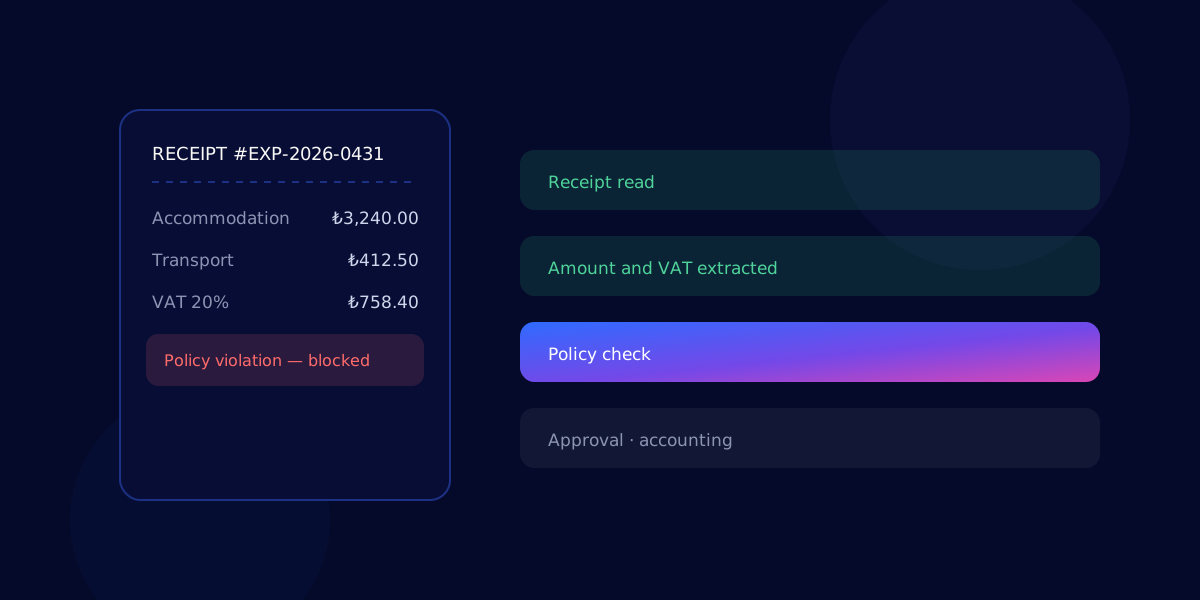
When people hear spend automation, the first thing that comes to mind is reading receipts. Extracting the amount, date and vendor from a document speeds up the process; but that's only the entrance. An expense recorded under the wrong category or over the limit stays wrong even when it's read automatically.
The real difference is that the organization's own rules run the moment the record is created. Checks such as category limits, a daily accommodation cap, a mandatory project code, document type and expected VAT kick in before the record is closed. Employees see the warning while they still remember the expense, and make the correction themselves.
Masraf-X follows exactly this order: it turns the receipt into a record and applies company rules the moment the record is created. That way, checking stops being a clean-up job at the end of the period and becomes a normal part of the process.
Why does the approval chain get longer, and how can it be shortened?
A long approval chain usually comes not from managers' lack of interest, but from missing context. A manager who sees only an amount and a short description on screen has to ask before approving: whose expense is this, what work is it part of, where is the document?
Every question is another round. The manager asks, the employee answers, the record goes back into the queue. These back-and-forths look small one by one, but accumulated over the period they make up most of the approval time.
When the context is already in the record, approval comes down to a single decision. If the rules engine has already filtered out the compliant records, the manager's attention is left only for genuine exceptions; the rest moves along within the flow.
An auditable trail and moving approved expenses into the ERP
An audit question always arrives in the same form: why, and on whose decision, was this expense approved? If the answer is scattered across emails, messaging apps and personal notebooks, the process isn't auditable, however fast it is.
The auditable trail should sit right next to the record. Which rule ran, which warning was issued, who accepted the exception and on what grounds, and when the approval came through should all be visible in the same record's history. This trail becomes a single source of truth for both internal control and questions from accountants and auditors.
The final step of the process is accounting. As long as approved expenses are still transferred to the ERP by hand, the time saved in the earlier steps is given back here; in solutions like Masraf-X, making this transfer a natural part of the flow is what makes automation meaningful from start to finish.
Key takeaways
- The delay in the expense process comes from the gap between the moment an expense happens and the moment it's recorded.
- Manual data entry produces errors, and duplicate records cost far more when they're only noticed after approval.
- The policy should live inside the record flow, not in a document; a rule applied late produces a dispute, not a warning.
- Receipt reading is only the entrance to automation; the real difference is rules running at the moment of entry.
- What shortens approval time isn't pressure, but having the context for the decision ready inside the record.
- Without an auditable trail and automatic transfer to the ERP, the time you save is given back at the end of the process.
Frequently asked questions
Is spend automation just about reading receipts?
No. Receipt reading speeds up the process by turning information on the document, such as amount, date and vendor, into a record; but on its own it doesn't ensure accuracy. An expense recorded under the wrong category or over the limit stays wrong even when read automatically. The real difference comes from applying company rules at the moment the record is created.
How can policy violations be prevented at the moment of entry?
The company's spending policy stops being a document left to human memory and becomes rules checked by the system. Checks such as category limits, mandatory fields, document type and project code run before the record is closed. Employees see the warning while they still remember the expense and can make the correction themselves.
Why does approval take so long in expense management?
The main factor that lengthens approval is missing context. When a manager can't see the reason for the expense, its document or the work it belongs to, they have to ask before approving, and every question sends the record back into the queue. When the context is ready in the record and compliant records have been filtered out in advance, the manager's attention is left only for exceptions.
How can duplicate expense records be prevented?
Duplicates usually arise when the same expense is entered both from a corporate card transaction and from a manually uploaded receipt, or when the same document is uploaded by more than one attendee. They're hard to weed out by eye because the records look very similar. Collecting records in a single flow and checking similar amount, date and document details at the moment of entry keeps the problem from surfacing only after approval.
How does approved expense data integrate with the ERP?
Once approval is complete, posting the record to accounting is the final step of the process. As long as this transfer is done by hand, the time saved in the earlier steps is given back here and a new risk of error appears. Moving approved expenses into the ERP as a natural part of the flow is what makes automation meaningful from start to finish.